Using Polydev with Windsurf
Add multi-model AI consultation to your Windsurf IDE setup for smarter code suggestions and problem-solving with Cascade.
Works across all IDEs: Polydev uses the universal Model Context Protocol (MCP) standard. The same MCP server powers Windsurf, Claude Code, Cursor, Cline, and Codex CLI. Just add it to your MCP config and mention "polydev" or "perspectives" in any prompt.
npm install -g polydev-ai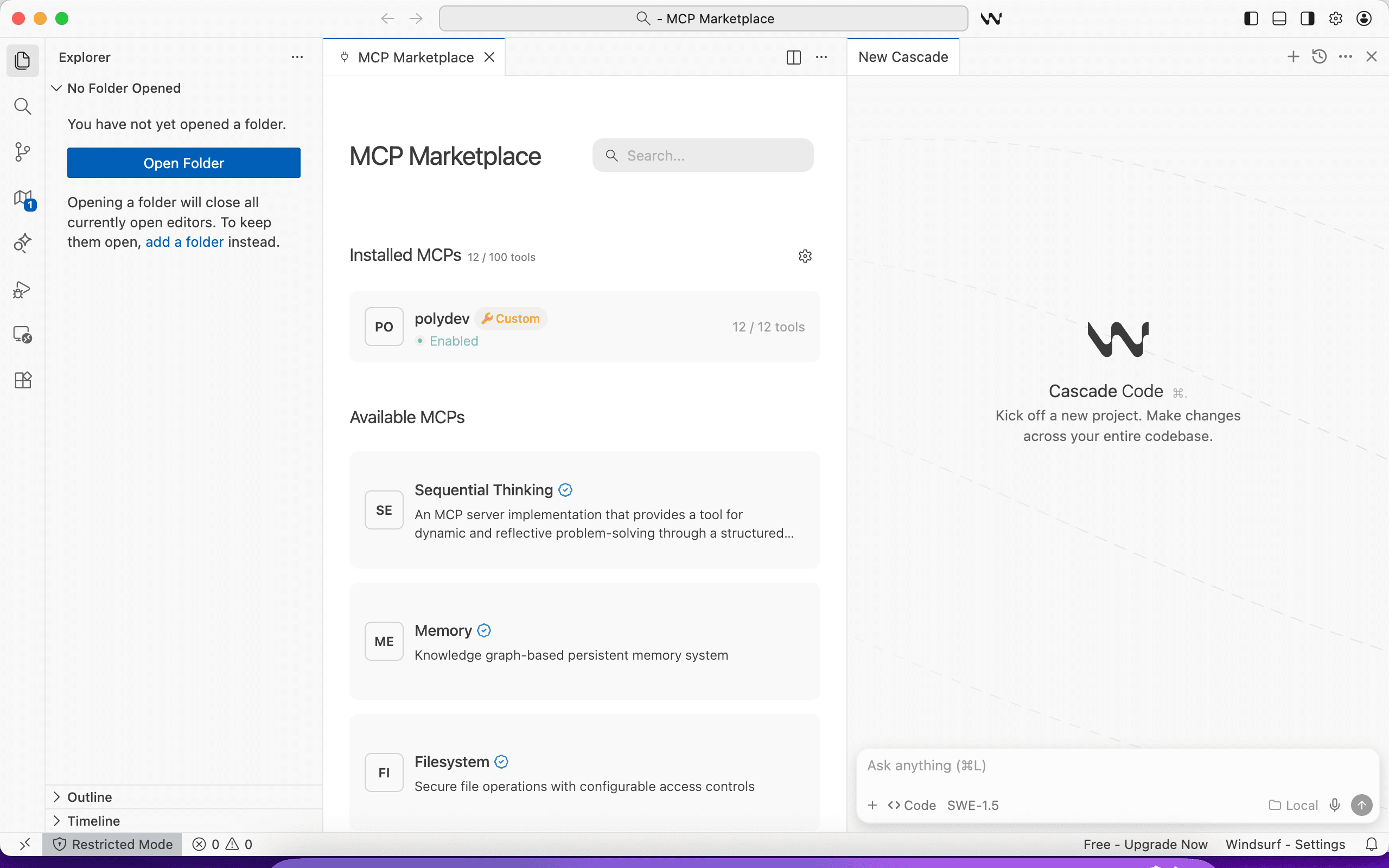
Windsurf MCP Marketplace with Polydev enabled
Quick Start
Get Polydev running in Windsurf in under 2 minutes:
Install Polydev
npm install -g polydev-aiRequires Node.js. This installs the polydev-ai command globally so you can run it from any terminal.
Authenticate
polydev-ai loginRun this from any terminal. Opens your browser and saves your token automatically. Alternative: get your token from polydev.ai/dashboard/mcp-tokens
Add MCP config
Create or edit ~/.codeium/windsurf/mcp_config.json:
{
  "mcpServers": {
    "polydev": {
      "command": "npx",
      "args": ["-y", "polydev-ai@latest"]
    }
  }
}
If you got your token manually instead of using polydev-ai login, add an env block: "env": { "POLYDEV_USER_TOKEN": "pd_xxx" }
Restart Windsurf
Close and reopen Windsurf to load the new MCP server. Cascade will automatically detect the new tool.
Use with Cascade
Ask Cascade to consult other models when you need different perspectives:
Manual Configuration
If the automatic installer doesn't work, you can manually configure Polydev:
Windsurf MCP Configuration
Create or edit ~/.codeium/windsurf/mcp_config.json:
{
  "mcpServers": {
    "polydev": {
      "command": "npx",
      "args": ["-y", "polydev-ai@latest"],
      "env": {
        "POLYDEV_USER_TOKEN": "pd_your_token_here"
      }
    }
  }
}
If you ran polydev-ai login, you can remove the env block — the server reads your saved token from ~/.polydev.env automatically.
Alternative: Settings UI
You can also configure MCP servers through Windsurf's settings:
- Open Windsurf Settings (
Cmd+,) - Search for "MCP" or navigate to Extensions → Cascade
- Find the MCP Servers configuration section
- Add a new server with the configuration above
Note: Windsurf uses mcp_config.json in the ~/.codeium/windsurf/ directory.
Usage Examples with Cascade
Cascade Flow Integration
You say:
"I need to refactor this authentication flow. Use polydev to get recommendations from multiple AI models before we make changes."
Cascade will query multiple models and incorporate their perspectives into its suggested changes.
Multi-File Analysis
You say:
"Review these database models for any design issues. Get polydev perspectives on the relationships and indexes."
Windsurf's multi-file context combined with multi-model consultation catches more issues.
Performance Optimization
You say:
"This React component is slow. Use polydev to get optimization strategies from different AI models."
Different models suggest different optimization approaches - memoization, virtualization, code splitting, etc.
Windsurf-Specific Tips
Cascade Flows + Polydev
When Cascade proposes a flow of changes, ask for Polydev perspectives before accepting. This adds a multi-model review layer to Windsurf's agentic coding.
Supercomplete Enhancement
For complex code completions, ask Cascade to validate Supercomplete suggestions with Polydev before accepting them.
Multi-Repository Context
Windsurf's workspace awareness combined with Polydev gives you multi-model consultation that understands your entire project structure.
Auto-Invocation with Windsurf Rules
Make Cascade automatically consult Polydev when you're stuck. Windsurf supports two approaches:
.windsurfrules (project root)
Read at the start of every Cascade session for this project.
AGENTS.md (project root)
Windsurf also supports AGENTS.md — the same format used by Codex CLI. Great if you share a repo across multiple IDE tools.
Global AI Rules
Settings → Cascade → Memories & Rules → Global Rules. Applies to all projects.
Add this to any of the above:
# Auto-Invoke Polydev for Multi-Model Perspectives

When the user encounters any of these situations, automatically
use the polydev MCP tool (get_perspectives) to consult multiple
AI models before responding:

1. User says "stuck", "confused", "not sure", or "can't figure out"
2. Comparison questions: "Should I use X or Y?"
3. Security or code review requests
4. After 2-3 failed debugging attempts
5. Architecture or design decisions
6. Performance optimization questions

Example: If user says "I'm stuck on this auth bug", call
polydev.get_perspectives with the problem context before answering.
Tip: Use .windsurfrules for Windsurf-specific rules. Use AGENTS.md if your team uses multiple IDEs (Codex, Windsurf, etc.) and wants shared instructions.
When to Use Multi-Model Consultation
Best for:
- Before accepting Cascade flows
- Complex refactoring decisions
- Security-sensitive code
- Architecture discussions
- Debugging elusive bugs
Skip for:
- Simple autocompletions
- Routine code changes
- Standard boilerplate
- Documentation updates
Troubleshooting
MCP server not connecting?
Check that ~/.codeium/windsurf/mcp_config.json exists and has valid JSON. Restart Windsurf completely after making changes.
Cascade not using Polydev?
Explicitly mention "polydev" in your prompt. Try: "Use the polydev MCP server to get perspectives from other AI models."
Slow responses or timeouts?
Multi-model queries take 10-60 seconds depending on prompt complexity. Windsurf does not currently support configurable MCP tool timeouts. Polydev handles timeouts server-side (400 seconds), but if Windsurf's built-in timeout cuts the connection early, try breaking complex prompts into simpler questions.
Config file location?
On macOS: ~/.codeium/windsurf/mcp_config.json
On Windows: %USERPROFILE%\.codeium\windsurf\mcp_config.json
On Linux: ~/.codeium/windsurf/mcp_config.json
Ready to get started?
Sign up for free and get your API key to start using multi-model consultation in Windsurf.